Hiding Dual Monitors and Cables in a Living Room Workspace
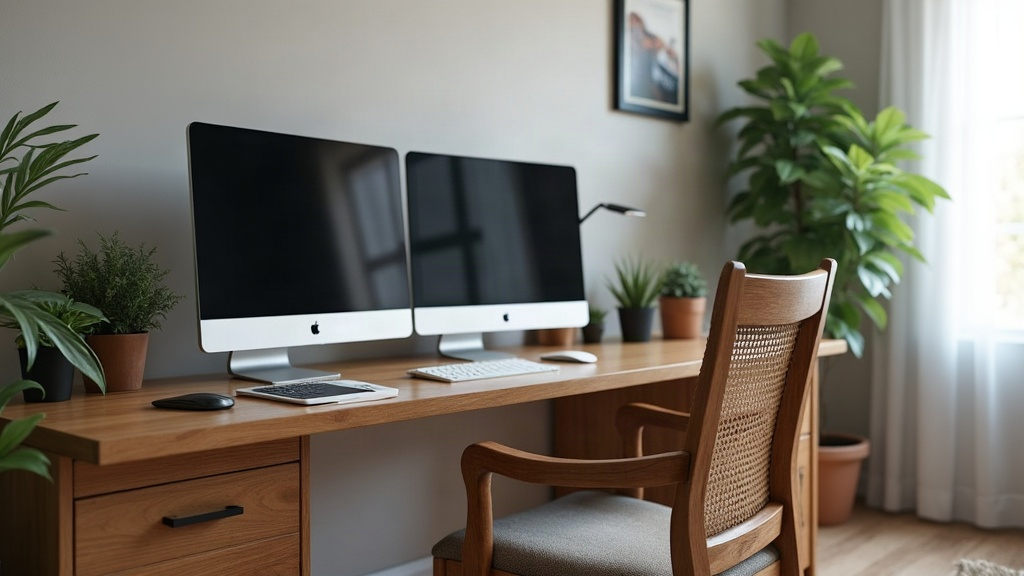
If your living room doubles as a home office, you already know the drill. Two monitors, a snake pit of HDMI and USB cables, a webcam perched somewhere awkward, and suddenly your “cozy living space” looks like a call center. The good news is you don’t have to live with that trade-off. With the right furniture, a decent mounting setup, and a handful of layout tricks, you can run a full two-screen workstation during the day and make it vanish by evening. Here’s how, step by step, based on methods that actually hold up in real apartments (not just showroom photos).
Why This Is a Common Problem
Dual-monitor setups are fantastic for productivity. The trouble is they were designed for dedicated offices, not for the corner of a shared living room. Two large screens on stands, plus power bricks, a tangle of HDMI cables, a USB hub, and a webcam, all add up to visual noise that clashes hard with sofas, coffee tables, and whatever décor you’ve worked to get right. The goal here isn’t to get rid of the tech. It’s to make it disappear the moment you’re done using it.
1. Choose Furniture That Conceals by Design
The single biggest upgrade you can make, hands down, is switching to furniture that’s actually built for hiding tech:
- Armoire-style desks or “cabinet desks”: These fold shut over your monitors, keyboard, and cables, so from across the room it just looks like a wardrobe or a credenza. Nobody walking in for dinner would guess there’s a workstation behind those doors.
- Lift-top or pop-up desks: A mechanism raises the monitor into view when you need it and drops it flush when you’re done. You’ll see this in a lot of modern secretary desks, and it’s oddly satisfying to use.
- TV console conversions: A low media console with doors can house a monitor arm just as easily as it hides a TV. Screens tuck behind closed doors, same concept, different device.
- Room dividers with built-in storage: A bookshelf-style divider does double duty. It visually separates the “office zone” from the “living zone” and gives you shelving to stash chargers, cables, and accessories.
If a full furniture swap isn’t in the cards right now (and let’s be honest, budget matters), even a simple desk with a curtain or sliding panel on a track can hide the whole setup in under ten seconds.
2. Use Articulating Monitor Arms, Not Just Stands
Fixed monitor stands are a pain to hide because of their footprint alone, they just sit there taking up space. Articulating (gas-spring) monitor arms solve that in three ways:
- You can fold both monitors flat against the wall or tuck them behind a piece of furniture when you’re not using them.
- Cables route through the arm’s internal channel, which realistically cuts visible cable length by 70 to 80 percent. That’s a huge difference when you’re standing three feet away looking at the setup.
- Your desk surface actually frees up, so you can drop a table runner, a small lamp, or a decorative tray over it once the monitors are folded away.
One practical note: check the VESA rating before buying. Most 24 to 32 inch monitors need a 75x75mm or 100x100mm VESA arm, and getting this wrong means returning a $60 mount you already installed.
3. Master Cable Management Before You Hide Anything
Here’s the thing nobody tells you: hiding a messy cable bundle just relocates the problem. You have to tame it first, or you’re just shoving chaos into a drawer.
- Cable sleeves and spiral wraps: Bundle every cord running from desk to wall into one neat sleeve. Takes maybe five minutes and instantly looks 10x cleaner.
- Under-desk cable trays: Mount a tray beneath the desktop to hold power strips and hubs completely out of view. This alone eliminates most of the “why is there a power strip on my rug” problem.
- Velcro cable ties, not zip ties: Reusable ties let you rearrange the setup later without hacking through plastic with scissors at 11pm.
- Wireless where possible: A wireless keyboard, mouse, and even a wireless dock for laptops cut your cable count dramatically, sometimes down to just the power cables.
- In-wall or in-leg cable channels: Some newer desks have hollow legs built specifically to route cables from the desktop down to a floor outlet. Worth checking for if you’re shopping for a new desk anyway.
4. Color-Match and Camouflage
Sometimes cables just have to stay visible, there’s no way around it. In that case, make them blend in instead of stand out:
- Use cord covers painted or wrapped to match your wall color exactly.
- Go black cables against dark furniture, white against light walls. Obvious, but people skip it.
- Run cables along baseboards using adhesive raceways rather than letting them cross open floor where you’ll trip on them (ask me how I know).
5. Zone the Room Visually
Here’s a subtle point: even with every wire hidden and every monitor folded away, a workspace corner can still “read” as an office to anyone glancing at it. You can counter that with a few visual cues:
- Place an area rug under just the desk zone. It defines that spot as separate from the rest of the living space, almost like drawing an invisible boundary.
- Use a folding screen or a bookshelf as a visual (and dust) barrier between the desk and the couch.
- Pick a desk finish that actually matches your existing furniture, walnut, oak, matte black, whatever fits, so the whole thing feels intentional rather than bolted on as an afterthought.
6. End-of-Day Reset Routine
This is the part that actually makes the illusion work long-term. A two-minute nightly routine, done consistently, keeps everything looking effortless:
- Fold the monitor arms flat or close the cabinet doors.
- Tuck the keyboard and mouse into a drawer or basket.
- Drop a decorative tray or a throw over the desk surface.
- Dim or switch off any task lighting so the room’s mood shifts back to “living room” instead of “workstation.”
Do this every evening and within a week it becomes automatic, no more thinking about it.
You genuinely don’t have to choose between a productive dual-monitor setup and a living room that looks guest-ready at a moment’s notice. Invest once in concealment-friendly furniture, a solid pair of articulating monitor arms, and a real cable management plan, and the daily transformation from “visible clutter” to “invisible corner” takes seconds, not minutes. Build the system once. After that, it’s just a quick nightly reset, and your living room gets its evenings back.